

理 Your library
Tags
Automatic tags from metadata, your own tags, and tagging many files at once.
Automatic tags
As files are read, Media Browser Pro tags them from their metadata, so a fresh library is already filterable:

| Kind | Examples |
|---|---|
| Resolution class | SD 720p HD FHD 2.5K 4K 8K |
| Frame rate | 24fps 30fps 60fps |
| Codec / format | h264 prores exr hdr photoshop |
| Transparency | has-alpha transparent |
| Shape | landscape portrait square |
| Length | short-clip long-clip |
| Type | video still |
The Tags section of the sidebar lists every tag in the library. Click one to filter the grid.
Adding your own
- One file — in the Details panel, click + next to TAGS.
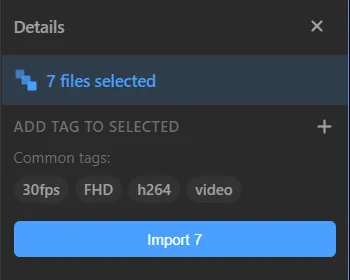
- A selection — select several files; the Details panel switches to n files selected. Type in Add tag to selected and press Add. Common tags shows the tags every selected file already shares.
- A whole directory — right-click it in the sidebar → Add Tag.
- From the import menu — the top of the menu has an Add tag to n files field.
Tip
Tag for how you search, not for what a file is. hero-sky, client-x or transition will save you more time than repeating what the automatic tags already know.
Something unclear or missing? Tell the sensei and the page will be fixed.