

移 Maintenance
Migrating a library
Export your library — with or without its cache — and import it on another machine.
Maintenance → Migrate Library… packages your library so you don’t have to re-index on a new machine.
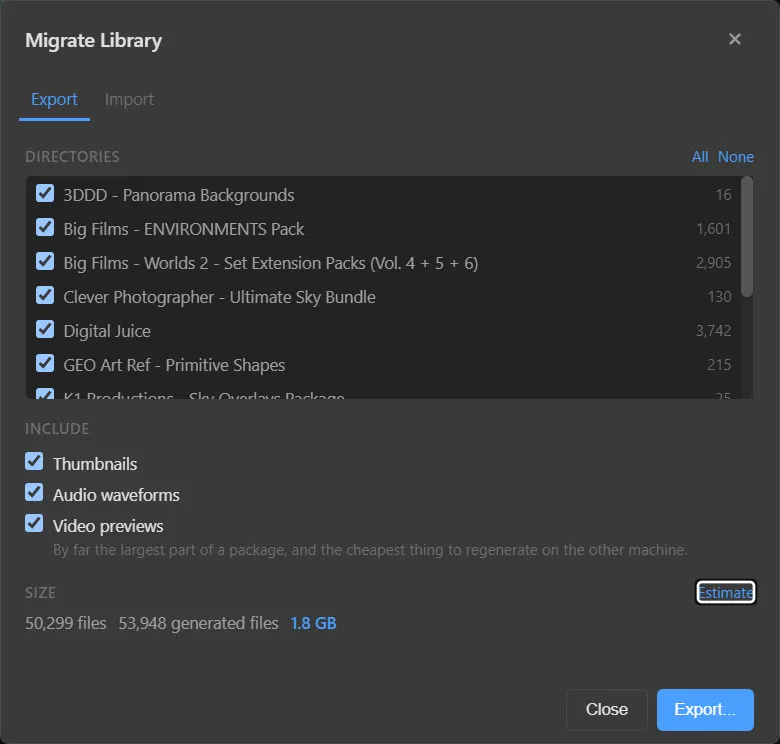
Export
- Open the Export tab.
- Under Directories, tick the ones to include. All and None toggle the whole list.
- Under Include, choose which generated files to bring:
- Thumbnails
- Audio waveforms
- Video previews — by far the largest part of a package, and the cheapest thing to regenerate on the other machine.
- Press Estimate to see the totals — for example 50,299 files · 53,948 generated files · 1.8 GB.
- Press Export… and choose where to save the package.
Import
- Install Media Browser Pro on the new machine.
- Open Migrate Library… → Import and choose the package.
- If you left previews out, run Maintenance → Repair All Previews… to regenerate them in the background.
Tip
Paths are stored as they were on the old machine. Keep your media at the same location (same drive letter and folder structure) on the new machine, then run Repair All Folders… to confirm everything is found.
Something unclear or missing? Tell the sensei and the page will be fixed.