
The Maintenance section colour-codes its buttons for a reason.
The two families
- Orange — Repair. Only regenerates what is missing: a thumbnail deleted from disk, a file whose metadata has never been read. Everything already known is skipped, including formats that previously failed. Fast, safe, run it any time.
- Red — Rebuild. Discards the existing thumbnails or previews for the whole library and builds them again. Slow, and only worth it when something is genuinely wrong.
The form
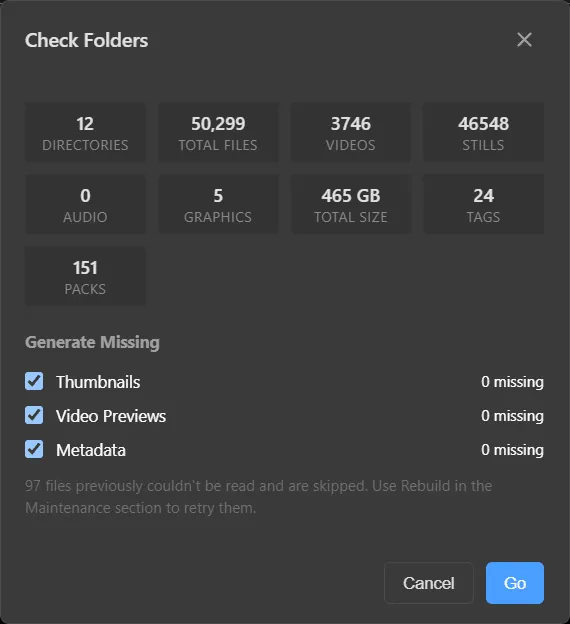
- Start with Repair All Folders… (the Check Folders dialog). It counts everything — directories, files, videos, stills, audio, graphics, total size, tags, packs — and shows how many thumbnails, previews and metadata records are missing.
- Tick what you want generated and press Go.
- Only reach for Rebuild if the repair did not fix what you see.
Note
Files that could not be read are remembered and skipped by Repair, so one broken file does not cost time on every pass. Use Rebuild to retry them.
Per directory
Right-click a directory in the sidebar → Maintenance to run the same repairs or rebuilds on just that folder. Handy right after you add a new pack.